CNIC SIM Check Online in Pakistan Complete Guide 2026

In Pakistan, mobile SIM verification is very important for security and personal identity protection. Many people want to know how many SIM cards are registered on their CNIC. The easiest way to verify this information is through cnic sim check online services approved by the Pakistan Telecommunication Authority (PTA). Today, almost every citizen uses mobile phones for banking, social media, online shopping, and communication. Because of this, checking registered SIMs has become necessary.
What Is CNIC SIM Check Online?
CNIC SIM check online is a verification process that allows Pakistani citizens to check the number of SIM cards registered against their Computerized National Identity Card (CNIC). PTA introduced this service to improve digital security and reduce illegal SIM usage. Through this system, users can quickly see how many SIMs are active on different mobile networks including Jazz, Zong, Telenor, Ufone, and SCO. The service is free, simple, and available for all Pakistani citizens.
Why CNIC SIM Verification Is Important?
SIM verification protects users from fraud and identity misuse. Criminals sometimes register illegal SIMs using stolen CNIC data. If a person does not monitor registered SIMs, they may face serious issues. Many users also search for 0330 which network code while checking SIM details because identifying network codes helps users verify registered mobile numbers more easily.
| Reason | Importance |
|---|---|
| Identity Protection | Prevents misuse of your CNIC |
| Security | Helps stop illegal communication |
| Banking Safety | Protects mobile banking accounts |
| PTA Compliance | Keeps SIM registration legal |
| Fraud Prevention | Detects unauthorized SIMs |
Many people now use cnic sim check online regularly to keep their records safe and updated.
Official PTA Method for CNIC SIM Check Online
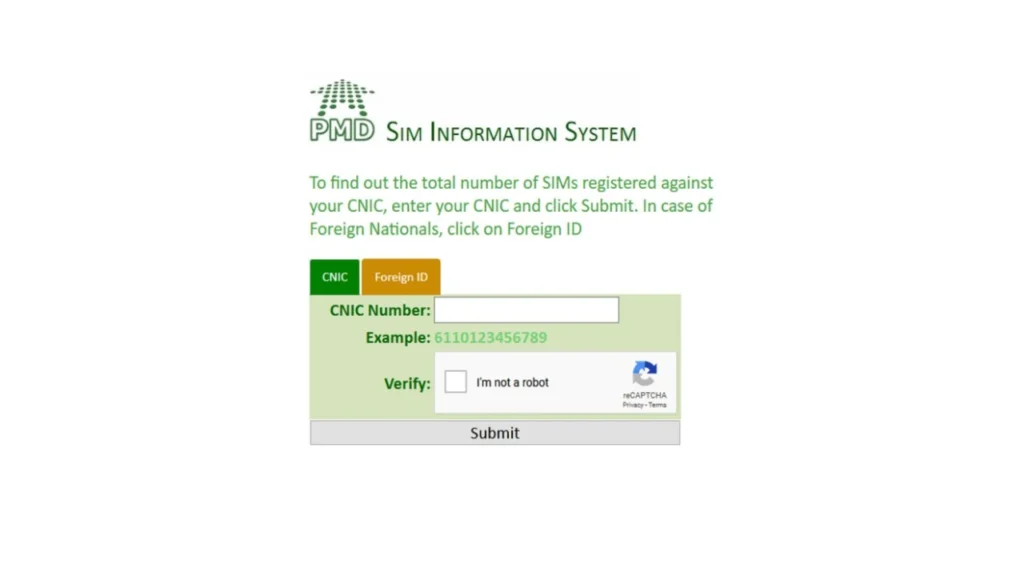
PTA provides an official system for SIM verification. This is the safest and most trusted method in Pakistan. Users can visit the official PTA SIM Information website and enter their CNIC number without dashes. After completing the captcha, the system displays all registered SIMs.
PTA Official Website
Website: https://cnic.sims.pk
| Step | Action |
|---|---|
| Step 1 | Open PTA SIM information website |
| Step 2 | Enter CNIC number |
| Step 3 | Complete captcha verification |
| Step 4 | Click submit |
| Step 5 | View registered SIM details |
The online method is fast and usually takes less than one minute.
How to Check SIMs Through SMS?
Some users may not have internet access. PTA also offers an SMS method for easy verification. To use this method, type your CNIC number without dashes and send it to 668. After sending the message, PTA sends a reply containing the number of active SIMs on each network.
| Service | Charges |
|---|---|
| SIM Verification SMS | Standard SMS charges apply |
This method is useful for people living in remote areas.
Mobile Networks Included in SIM Verification
The PTA verification system supports all major telecom networks in Pakistan.
| Network | Supported |
|---|---|
| Jazz | Yes |
| Zong | Yes |
| Ufone | Yes |
| Telenor | Yes |
| SCO | Yes |
When using cnic sim check online, the result shows SIM counts separately for each network.
How to Block Unauthorized SIMs?
If you find an unknown SIM registered on your CNIC, take immediate action. Unauthorized SIMs may lead to fraud or legal issues.
Steps to Remove Illegal SIMs
| Action | Purpose |
|---|---|
| Visit Franchise | Request biometric verification |
| Contact Helpline | Report unauthorized SIM |
| File Complaint | Notify PTA if needed |
| Block SIM | Remove suspicious number |
Always carry your original CNIC when visiting a franchise office.
Benefits of CNIC SIM Check Online
The online system offers many advantages for Pakistani users.
1. Fast Verification
The online method provides results instantly. Users do not need to visit mobile franchises for basic verification.
2. Better Security
Regular SIM checks help users identify suspicious registrations quickly.
3. Easy Access
Anyone with internet access can use the PTA portal anytime.
4. Free Service
The PTA online system is free for all Pakistani citizens. Because of these benefits, many people now prefer cnic sim check online instead of visiting telecom offices.
Common Problems During SIM Verification
Some users face issues while checking SIM information online. Most problems are simple and easy to fix.
| Problem | Solution |
|---|---|
| Website Not Opening | Refresh browser or try later |
| Invalid CNIC Error | Enter CNIC without dashes |
| Captcha Error | Reload captcha image |
| No Result Showing | Check internet connection |
Users should also avoid fake websites claiming to provide SIM ownership data.
Difference Between PTA and Third Party Websites
Many websites claim to offer SIM owner details. However, users should only trust PTA-approved systems.
| Feature | PTA Official System | Third Party Websites |
|---|---|---|
| Legal | Yes | Often Illegal |
| Secure | Yes | Risky |
| Accurate | Yes | Sometimes Fake |
| Free | Yes | May Ask for Payment |
| Privacy Protection | High | Low |
Using unauthorized platforms can expose personal information to scammers.
How SIM Verification Helps Digital Pakistan?
Pakistan is moving toward digital services rapidly. Mobile banking, online education, and e-commerce are growing every year. Secure SIM registration supports this digital transformation by reducing cybercrime and identity fraud.
| Sector | Impact |
|---|---|
| Banking | Safer transactions |
| Communication | Verified users |
| Security | Reduced illegal activity |
| E-commerce | Better customer trust |
The role of cnic sim check online has become very important in maintaining digital safety.
Tips for Safe SIM Usage
People should follow safe mobile practices to protect their identity.
Important Safety Tips
- Check SIM registration every few months
- Block unused SIM cards
- Never share CNIC copies with unknown people
- Use biometric verification only at official franchises
- Avoid fake SIM information websites
How to Verify SIM Owner Information?
If users want to check the ownership of the SIM inserted in their phone, they can use another PTA service. Send MNP to 667. The system replies with the registered owner name and partial CNIC details. This service helps users confirm ownership before buying a used SIM.
CNIC SIM Check Online for Overseas Pakistanis
Overseas Pakistanis can also verify SIM information if they have a valid Pakistani CNIC or NICOP. They can access the PTA website from abroad and check registered SIMs easily. This helps overseas citizens monitor identity misuse in Pakistan.
PTA Rules About Biometric Verification
PTA requires biometric verification for all new SIM registrations. Telecom companies use fingerprint scanning systems to confirm identity. Without biometric verification, no new SIM can be activated legally in Pakistan.
| Rule | Description |
|---|---|
| Biometric Mandatory | Required for every SIM |
| Original CNIC Needed | Copies are not accepted |
| Franchise Verification | Only authorized centers allowed |
| Illegal SIM Blocking | Unverified SIMs may be blocked |
These regulations improve national security and reduce fake registrations.w as Pakistan becomes more digital.
Final Words
SIM verification is now an important part of digital life in Pakistan. Every citizen should regularly check the SIMs registered on their CNIC to avoid fraud and identity misuse. The PTA system makes this process simple, secure, and free for everyone. Whether users choose the online portal or SMS service, both methods provide quick results. Using cnic sim check online helps protect personal information, supports national security, and keeps mobile communication safe. Always use official PTA services and avoid fake websites that claim to provide SIM ownership details.