How to Check Zong Number Detail in Pakistan Verified Guide

Knowing your SIM information is very important in today’s digital life. Many users search online to learn how to check Zong number detail because SIM verification is now linked with security, banking, and online services. Zong provides simple and legal ways to check number details without confusion.
Why Checking Zong Number Details Is Important?
Every mobile number in Pakistan must be registered on a valid CNIC. When users understand how to check Zong number detail, they can protect their identity from misuse. This process also helps users confirm ownership and avoid legal issues. Unverified or wrongly registered SIMs may stop working. Regular checking ensures your Zong SIM remains active and secure.
Basic Information You Can Check on a Zong Number
Zong allows users to verify limited but essential details. These details help confirm SIM ownership and registration status. For example, if you want to check your Zong data usage, you can use the Zong MB Check Code to easily view your remaining data balance. This is a helpful tool alongside other verification services Zong provides.
| Detail Type | Description |
|---|---|
| Mobile Number | Confirms the active Zong SIM number |
| CNIC Link | Shows if the SIM is registered on your CNIC |
| Active Status | Confirms whether the SIM is active or blocked |
| Number Count | Displays total SIMs registered on your CNIC |
Zong never shares private personal data through SMS. This keeps customer information safe.
How to Check Your Own Zong Number Easily?
Many users forget their own number after inserting a new SIM. Learning how to check Zong number detail starts with checking your own number using a simple USSD code. You can dial *8# from your Zong SIM. The system instantly displays your mobile number on the screen. This method works without balance or internet. It is the fastest and safest way for new users.
How to Check Zong SIMs Registered on Your CNIC?
The PTA provides an official SMS service for SIM verification. This method helps users understand how to check Zong number detail linked with their CNIC. You must type your CNIC number without dashes. Send it to 668 using your Zong SIM. After a few seconds, you receive a message listing all Zong numbers registered on your CNIC. Standard SMS charges may apply.
Step-by-Step CNIC Verification Process
This method works across Pakistan and follows PTA rules. It helps users track extra or unknown SIMs.
| Step | Action |
|---|---|
| Step 1 | Open SMS on your phone |
| Step 2 | Type CNIC without dashes |
| Step 3 | Send to 668 |
| Step 4 | Read reply with registered numbers |
This process improves SIM security and prevents illegal usage.
How to Check Zong Number Through Customer Service?
- Some users need full confirmation for legal or ownership reasons. Visiting a Zong Service Center is the most reliable way to verify SIM records.
- When you understand how to check Zong number detail through official support, you avoid fraud and misinformation. Bring your original CNIC for biometric verification.
- Zong staff can confirm ownership, correct records, or block unauthorized SIMs.
Online PTA SIM Information System Explained
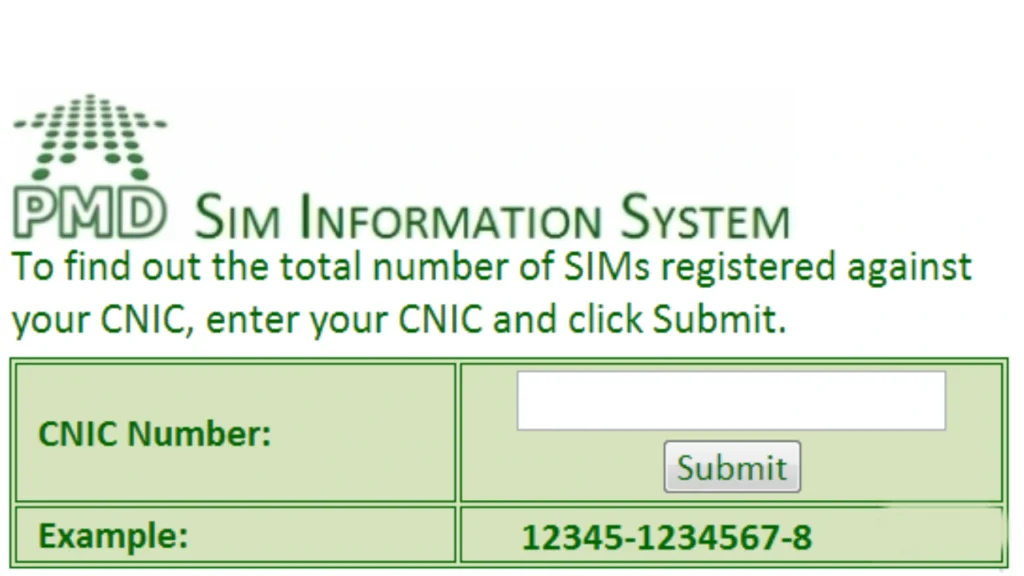
- PTA also offers an online SIM information system. This platform supports users who want to learn how to check Zong number detail digitally.
- You must enter your CNIC on the PTA website. The system displays all mobile networks linked with your CNIC.
- This method works nationwide and supports mobile security campaigns.
What Information You Cannot Check Legally?
Pakistani law protects user privacy. Even if you know how to check Zong number detail, you cannot access someone else’s personal data. Zong does not allow checking names, addresses, or CNIC numbers of other users. Any website claiming this service is unsafe and illegal. Always rely on official Zong or PTA platforms only.
Common Problems While Checking Zong Number Details
Some users face delays or errors during verification. These issues usually happen due to system load or incorrect CNIC format. Learning how to check Zong number detail also means understanding how to fix these problems. Users should resend the CNIC without spaces or dashes. If issues continue, visiting a Zong franchise resolves the problem quickly. Additionally, if you experience issues with your mobile packages, you can dial *7777# Zong Weekly Package to check or activate your weekly offers.
Tips to Keep Your Zong SIM Secure
- SIM security is a shared responsibility. Regular checks help users stay safe and compliant with PTA rules.
- You should always register SIMs on your own CNIC. Block unused numbers to avoid misuse.
- Never share CNIC copies or OTPs with unknown people.
Difference Between Zong SIM Check and Other Networks
Each network follows PTA guidelines but uses different codes. Zong offers simple USSD and SMS services.
| Network | SIM Check Code |
|---|---|
| Zong | *8# / SMS to 668 |
| Jazz | *99# |
| Ufone | *336# |
| Telenor | *888# |
Zong methods remain easy and fast for all users.
Conclusion
Understanding how to check Zong number detail helps users stay secure, legal, and informed. Zong provides official methods that work across Pakistan without confusion. These methods protect user privacy while ensuring SIM compliance. Always use verified codes, official SMS services, or Zong franchises. Regular SIM checks protect your identity and keep your mobile services running smoothly.